Help
Purchases, codes and background
How to get an activation code for Stellio?
Buy Stellio on Google Play, then email stellio.play@gmail.com from the email of the Google account you bought with: we'll send you an activation code to enter in the app. Can't buy on Google Play? Email stellio.play@gmail.com as well.
I bought a code on the website and can't activate it
Please use Restore code: pick the app, and we mail its codes again and unbind them. Enter one on the new device right away.
I bought on Google Play and can't activate
Log in to your Google Play account on this device and reopen Stellio: the purchase is applied automatically.
Still not active?
- Check that Play Store uses the same Google account you paid with (Play Store → your profile picture).
- Check you are online and the Play Store app is up to date.
- Clear the Play Store cache: Settings → Apps → Google Play Store → Storage → Clear cache.
- Find the order in Play Store → profile picture → Payments & subscriptions → Budget & history. No order there? It was paid from another Google account.
- Close Stellio completely, wait a few minutes and open it again.
Apps like Lucky Patcher can block the licence check. Nothing helped? Email us from the email of the Google account you bought with.
A Stellio app stops working in the background
Some phone makers (Samsung, Xiaomi, Huawei, OnePlus and others) close apps running in the background to save battery, so a Stellio app stops after a while.
To stop it:
- Open your phone's battery settings.
- Pick a Stellio app and let it run in the background: choose "Unrestricted" (Samsung: remove it from "Sleeping apps" and "Deep sleeping apps").
- Your phone maker's own steps are on dontkillmyapp.com.
Android can also refuse to start a Stellio app's background run: it works while the app stays open, and opening the app tries again.
How do I activate a code on another device?
- In the player: Settings → About → Bind the code. It binds the code to your Google account.
- On the new device, open the purchase dialog → Have bound code?
Never bound it and changed or lost the phone? Email us, any message: we find your codes and move them. Or unbind the code and activate it again.
How do I activate an older code (Stellio Premium, a single theme, a widget pack)?
These are no longer sold; their codes still activate.
Stellio Premium
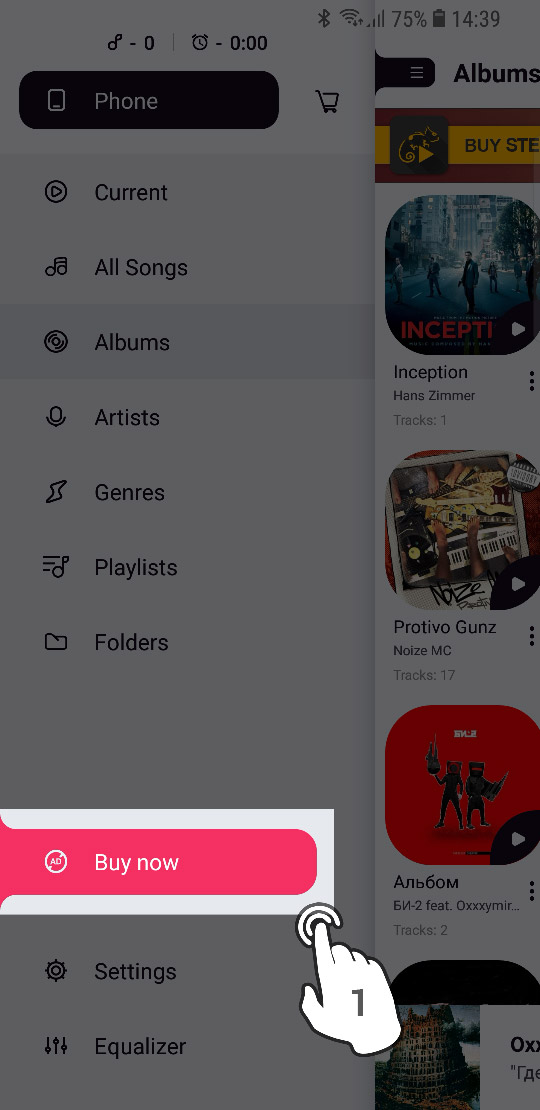 1Main menu → Buy.
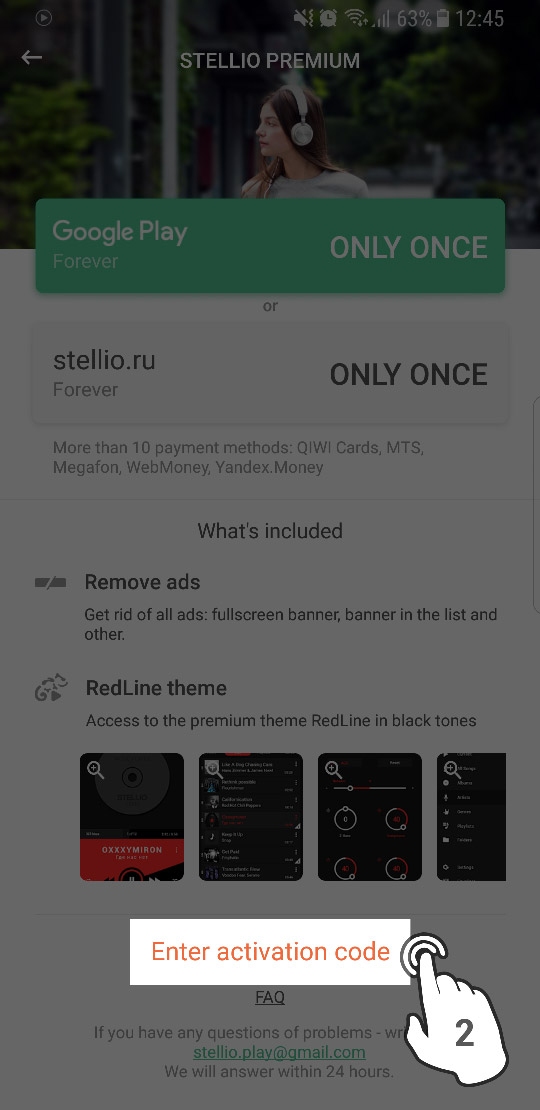 2Tap Enter activation code at the bottom.
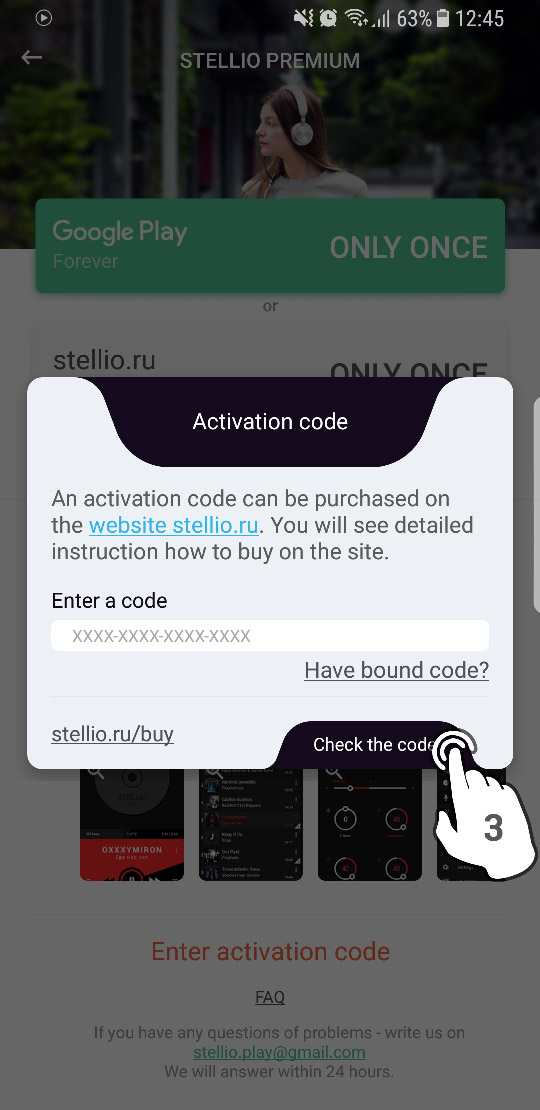 3Enter the code while online and tap Check the code.
A single player theme
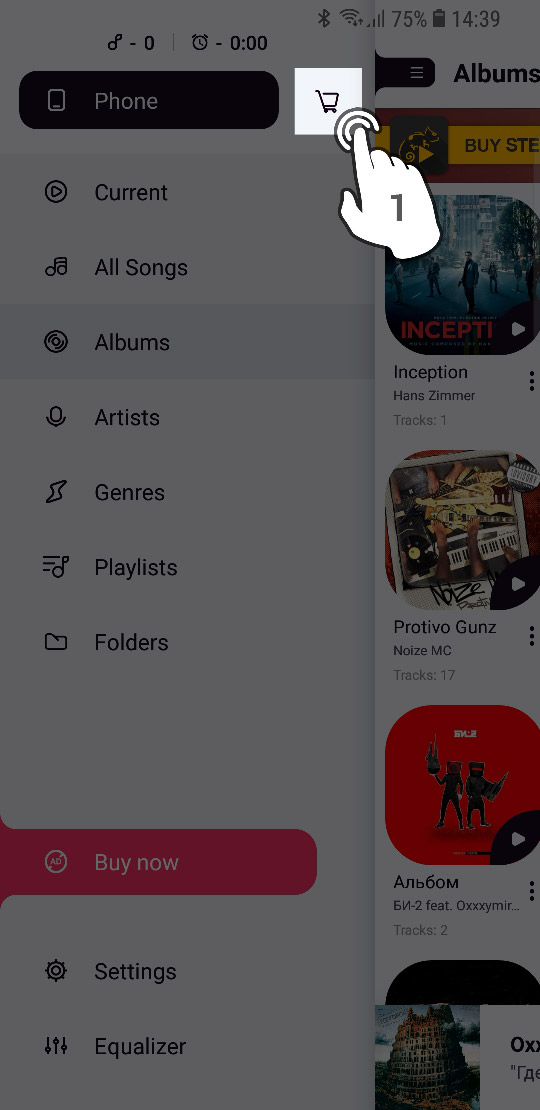 1Main menu → basket icon.
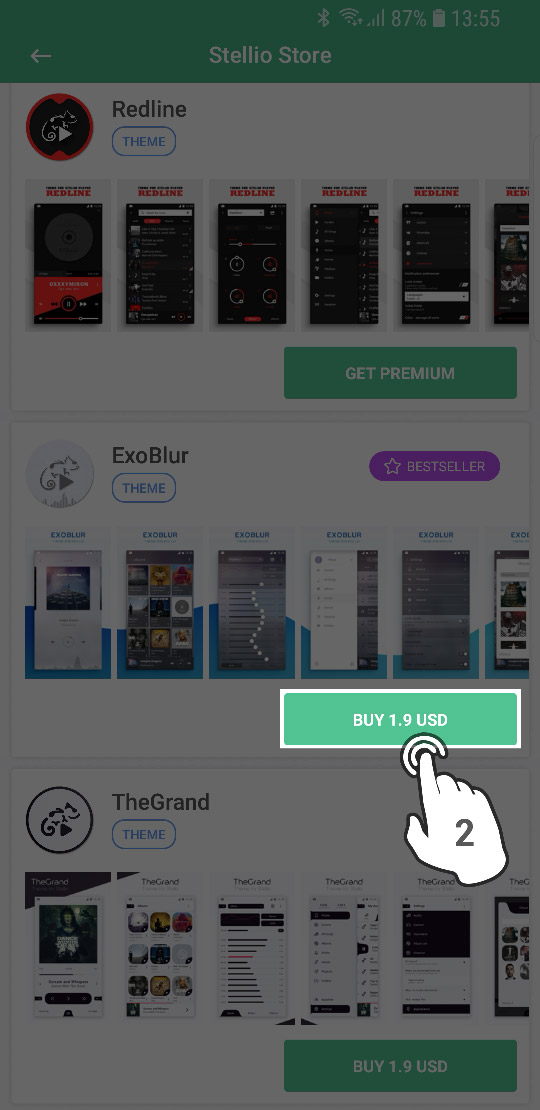 2Find the theme in Stellio Store and tap Buy.
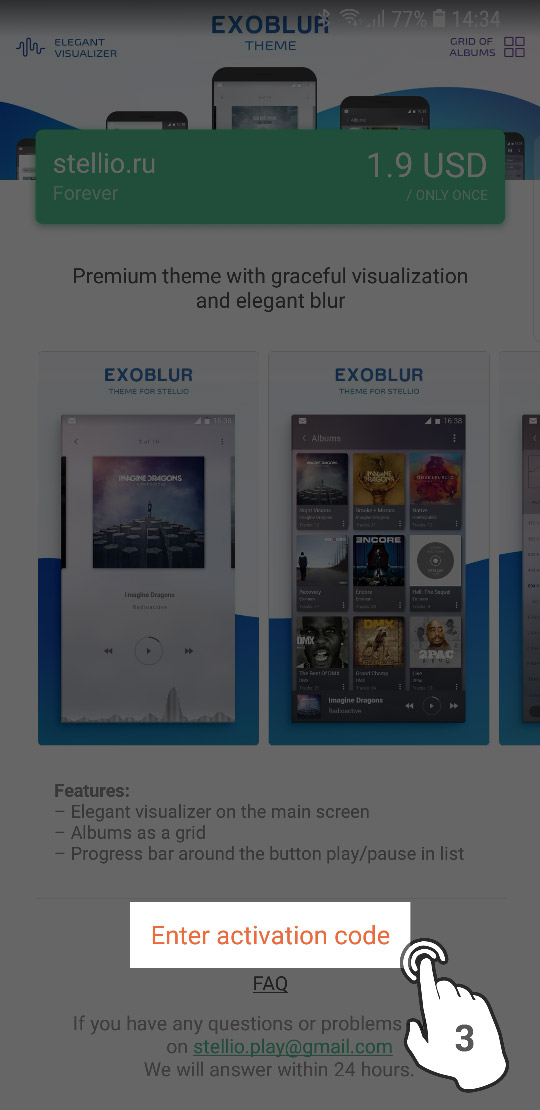 3Tap Enter activation code.
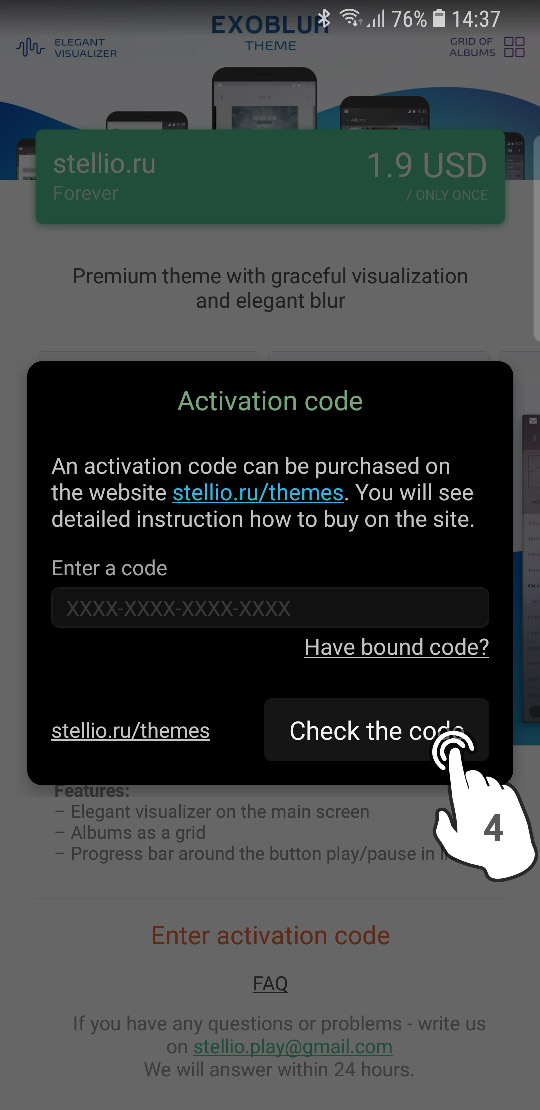 4Enter the code while online.
A widget pack
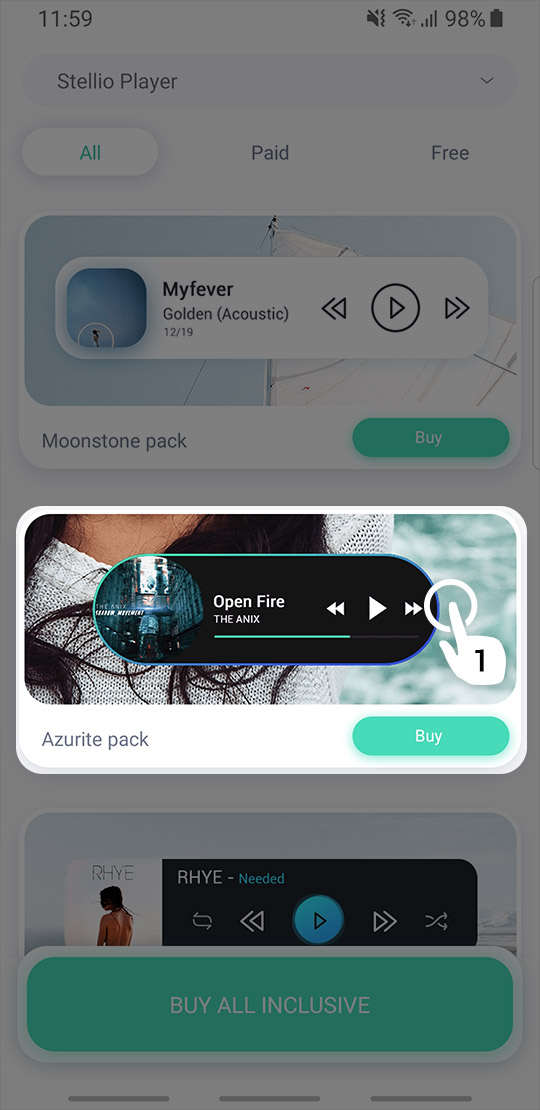 1Open the pack's page.
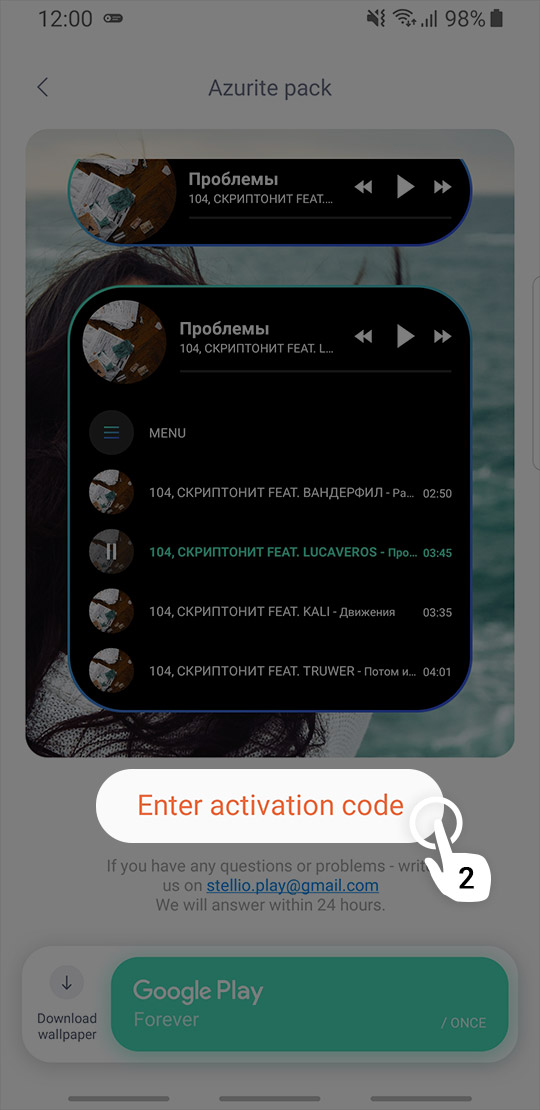 2Tap Enter code at the bottom.
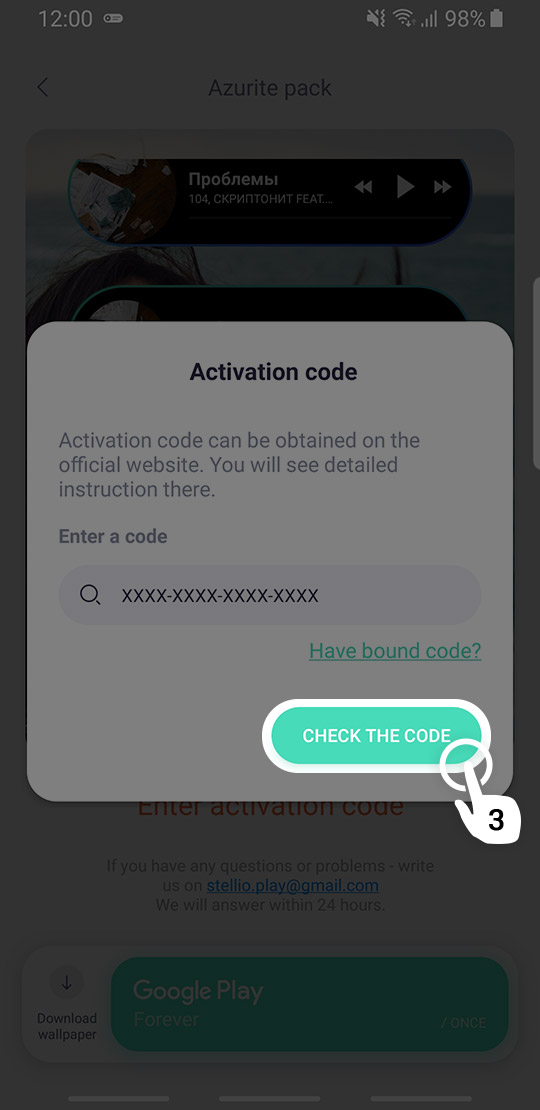 3Enter the code while online.
By app
 Stellio Player
Purchase
How to activate Stellio Premium on my other devices?
If you bought in-app via Google Play:
- Log in Google Play with account where you bought Premium.
- Close and open the player. It will be activated automatically
If you have an activation code:
- Settings => About => Bind code.
- Open the player on another device and in the purchase dialog click on Have bound code?
Playback
How to use 3-rd party equalizers with Stellio?
- Disable the equalizer in Stellio — Equalizer=>Menu=>Disable
- If it does not help — kill and open Stellio or reboot the phone
- Enable compatible mode if you use ViPER4Android (ViperFX)
Music skips, hiccups, stutters
Audio skipping is a complex issue, it can be generated by many factors:
- SD card issues (try to play same file in stock player, if it happens there as well — that's it). Can happen also if many songs/images/movies recently uploaded to the phone (stock system scanner one some devices is slow and takes a lot of SD card bandwidth)
- Bluetooth issues. This usually affects any player on the device. Try to Unpair, then Pair BT device again
- HTC Sense 4.0+Beats ROMs produces skips. Try to disable beats for Stellio
- additional 3rd party audio effects. Try to temporarily disable additional audio effects and check if it helps
- some cpu hungry apps (free app like OSMonitor can show total and per process cpu consumption and find offending app/service)
- some broken formats (if skipping happens for the same songs, always, and doesn't happen for others)
You can increase audio buffer in order to prevent stuttering via Settings => Audio => Audio buffer size
Music stops when locking a screen
Check:
- If your device has "White list of apps" then try to add the player there.
- Check permission for background activity.
- Try to disable player's equalizer (Equalizer — Context menu Three dots at the right top corner — Disable).
Phone makers close apps in the background to save battery: see A Stellio app stops working in the background.
Other
Which permissions has the player and why?
- READ_PHONE_STATE — Set pause on call and resume playback on call end.
- WRITE_EXTERNAL_STORAGE — Save covers, cache tracks, delete tracks, edit tags.
- INTERNET — Access to network. To be able to download covers, view lyrics and do all actions with VKontakte.
- ACCESS_NETWORK_STATE — Check whether or not internet is available.
- WRITE_SETTINGS — To be able to set a track as ringtone.
- ACCESS_WIFI_STATE — To check whether or not download cover art. Need only if you enable "Only via WiFi".
- RECEIVE_BOOT_COMPLETED — To start background service to be able to listen headset events. Need only if you enable "Start playing on headset is plugged" or "Start playing on bluetooth headset is plugged".
How to move cache on a sdcard?
- Move your cache to the folder you need using a file manager
- Change path to the folder with cache in the player: Settings — VKontakte — Folder for cached tracks
- Settings — VKontakte — Import cache
Why I am online from a computer when I use Stellio?
Unfortunately, since there's no official API for music from VKontakte, we use "not standard" methods, side effect of which is online.
If you still want to be offline, try to avoid: My music, Friend's and Group's audios and Recommendations.
 Stellio Equalizer
Purchase
How do I activate the full version of Stellio Equalizer on my other devices?
If you bought it on Google Play:
- Sign in to Google Play with the account you bought it with.
- Close and open Stellio Equalizer. It activates by itself.
If you have an activation code:
Open Stellio Equalizer on the other device, tap I have a code and enter the same code.
Equalizer doesn't work?
Where do I start?
Try these in order:
- Restart the player: close the music app fully and open it again, once. A player tells Android about its sound as it starts, and that is when the equalizer hears it.
- Known players (in the app): check that your player is listed and its switch is on. A player the equalizer does not reach says why there, with its fix.
- Advanced player tracking (in the app): finds players that never tell Android about their sound. It needs a permission, given once.
- The Shizuku path: every effect reaches the app playing, with no setting in the player. How to set it up is under "The Shizuku path" below.
- Global equalization (in the app): the last resort. The whole output mix is equalized, not per app. Deprecated by Google and might not work on some devices.
The ways the equalizer reaches other apps' sound, and what each needs: How the equalizer finds players (in the app).
Samsung: Sound Assistant
Turn Sound Assistant off, or at least its own equalizer: two equalizers on one sound fight each other.
Samsung: UHQ upscaler
In Sound quality and effects, set UHQ upscaler to "Bit upscaling only". Its other modes play past the equalizer.
Xiaomi: USB debugging (Security settings)
In Developer options, turn it on as well. Without it the phone refuses the permission Advanced player tracking needs.
OnePlus: Disable permission monitoring
In Developer options, turn it on. Without it the phone takes back the permission Advanced player tracking needs.
Spatial audio is on
Some phones send spatialized sound past the equalizer. No change heard? Turn spatial audio off and try again. While Global equalization is in use, only spatialized sound gets the equalizer.
My output plays direct or bit-perfect
A direct or hi-res output plays sound past every effect, and a USB DAC playing bit-perfect takes no effect either, so the equalizer cannot reach them. Turn direct, hi-res or bit-perfect output off in the player or the phone's settings, or pick another output.
Sound comes a little late
On the Shizuku path, the app it takes plays a tenth to a fifth of a second later: in videos the picture can run ahead of the voice. Nothing in the app changes that.
The Shizuku path
What is the Shizuku path?
The free Shizuku app lets the equalizer take the sound an app plays, so every effect reaches that player: the equalizer and also reverb, echo, auto volume, stereo width and crossfeed. Your player needs no setting for it.
Off, the default path equalizes each app on its own, without those extra effects.
How do I set it up?
- Install Shizuku from Google Play.
- Open it and start it with Wireless debugging; it shows every step. On a rooted phone it starts with one tap.
- Come back to Stellio Equalizer, open Settings (in the app) and tap "The Shizuku path". Shizuku asks you once to allow the equalizer.
Once allowed, the Shizuku path switch in Settings turns it off and on.
What are the trade-offs?
- One app at a time gets the effects: the app that started playing last. The others play as they are.
- It takes any app's media sound, not only music: videos and games change too. Calls, alarms and notifications stay as they are.
- A little more delay: in videos the sound can lag a moment behind the picture.
- The equalizer records what your apps play, to change their sound.
An app plays without effects on the Shizuku path
Only the app that started playing last gets the effects: start playback in it again.
Some apps forbid capturing their sound. Known players (in the app) says so: "the app forbids capturing its sound". On the Shizuku path they play without the equalizer; turn the Shizuku path off in Settings to equalize them the default way.
Shizuku stopped or the equalizer lost its access
After a phone restart Shizuku needs starting again; the permissions it already gave stay. Until it runs, the equalizer works on the default path and shows "Shizuku is not running": tap Open Shizuku and start it.
Shizuku no longer allows the equalizer? In Settings tap "The Shizuku path": Shizuku asks once more. If an Android update takes a permission back, the equalizer tells you with a notice: tap it to set it up again.
Equalizer
The equalizer has no effect in my player
The equalizer works with players that support equalization. Open Settings > Known players to see which of your players it has reached. A player that is not listed has not announced itself yet: start playback in it, or try Advanced player tracking. The Shizuku path reaches it with no announcement.
I started my player before the equalizer
A player that was already playing when the equalizer started may need a restart. Close it completely (swipe it away in the recent apps) and open it again.
Can I equalize everything I hear?
Yes: turn on Global equalization in Settings. The whole output mix is equalized, not per app. Deprecated by Google and might not work on some devices.
What is Advanced player tracking?
It lets the equalizer find players that do not announce themselves. Turn it on in Settings > Advanced player tracking and give the access it asks for.
Automation
Can Tasker or Samsung Routines control the equalizer?
Yes. Samsung Modes and Routines lists the equalizer's actions: turn it on, turn it off and apply a preset. Add one to a routine like any other action.
Tasker and other automation apps send the broadcast io.stellio.music.equalizer.API_COMMAND to the package io.stellio.music.equalizer, with the extra cmd set to on, off, toggle or preset. A preset also needs its number in the extra id; the presets and their numbers are listed at content://io.stellio.music.equalizer.automation/presets.
 Music Widgets
Purchase
How do I get my widgets on my other devices?
- Sign in to Google Play with the account you bought them with.
- Close and open Music Widgets. Your widgets unlock by themselves.
Widgets
Widget says "No data". When I click on a widgets, nothing happens
The player should translate metadata for correct work of widgets. Currently Stellio Player, Poweramp have the best integration.
If you use Stellio - update it to the last version, and ensure that you didn't turn off Translate song metadata preference. Also you should select Stellio in Widgets app.
How to turn off the notification?
Unfortunately android requires notification to run background service.
Why I can't change time on progress bar?
Unfortunately android doesn't have this capabilities for widgets. If you find a widget that can do that - let us know
No answer found. Try other words, or email us.